Managing Disk Space
Posted By Mad On August 13, 2007 @ 11:19 pm In Geek | 2 Comments
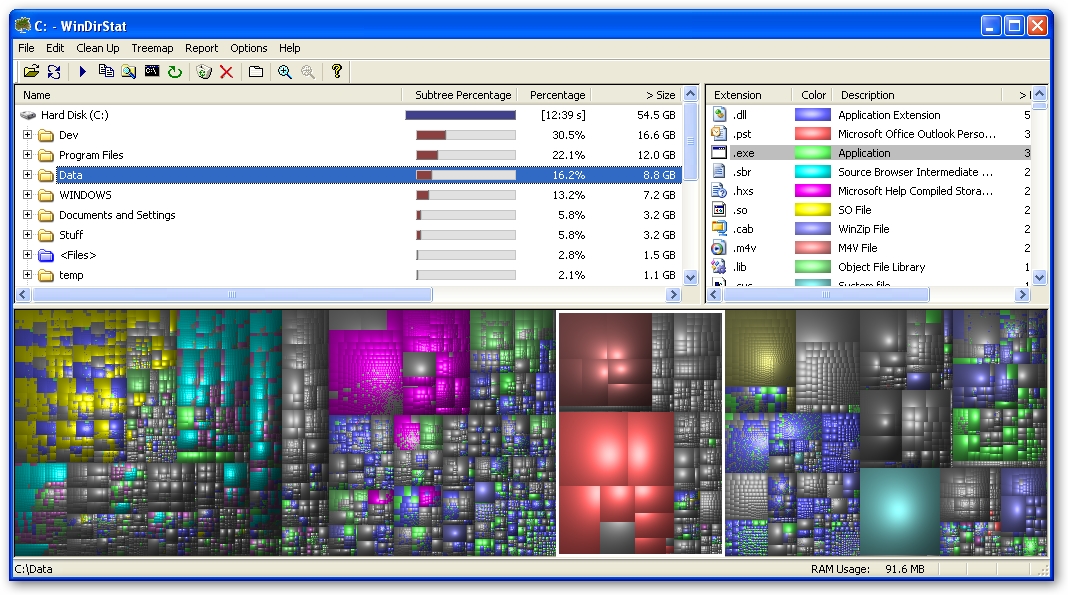
WinDirStat: Windows Directory Statistics [1] is a Windows utility which allows you to view disk space usage, broken down by:
- Folder/Directory – percentage of parent folder allows you to identify the folders taking up the most space.
- File type summary – useful for seeing how much space your pictures take up
- Individual files
The graphical view, called TreeMap, allows you to easily identify the largest files.
 [2]
[2]
After installing and letting it analyze my disk, I was able to instantly free up 2.0 GB which was used by archives of old database backups I had forgotton about.
WinDirStat took 12 minutes and 39 seconds to analyze my disk which contains 36, 406 folders and 460,374 files totalling 54.5 GB.
And the best bit it is open source (hosted on SourceForge.net [3]) and free.
Article printed from BlogWell: http://blog-well.com
URL to article: http://blog-well.com/2007/08/13/managing-disk-space/
URLs in this post:
[1] WinDirStat: Windows Directory Statistics: http://sourceforge.net/projects/windirstat/
[2] Image: http://blog-well.com/wp-content/uploads/2007/08/windirstat.jpg
[3] SourceForge.net: http://sourceforge.net
Click here to print.