Subscribe
Apologies if you have been reading BlogWell and you’ve noticed posts coming and going; two posts in particular:
Make a Blog Plan, and Identify your your Audience are now available at How to Build a Site with WordPress.com

Apologies if you have been reading BlogWell and you’ve noticed posts coming and going; two posts in particular:
Make a Blog Plan, and Identify your your Audience are now available at How to Build a Site with WordPress.com
Before you begin your online publishing project, one decision you need to make is whether to publish a blog or a Web site.
Web sites have static pages; this means your home (front) page remains the same every time someone visits, as does the rest of the site.
Blogs are mini Web sites with one major difference; the home page will change every time you add content. Appearing in reverse chronological order, your most recent entry is seen at the top of the home page, older entries run below that.
Technorati is now tracking in excess of 91 million blogs, and increasingly blogs are becoming more accepted as a way to establish an online presence.
On WordPress.com, when it comes to blogs vs. Web sites, everything else is pretty much the same:
Looking for undo & redo in the new Office 2007 ribbon?
It ain’t in the ribbon, it is in the quick access toolbar. But hey didn’t the ribbon replace toolbars!
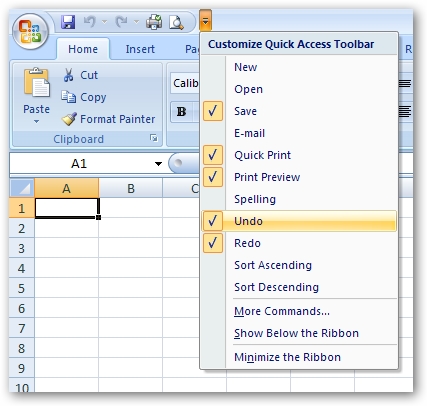
Ctrl-Z works fine – thankfully they didn’t change this.
The new ribbon user interface in Office 2007 takes a little getting used to. Sometimes you just want to do something immediately, but can’t find the command in the ribbon. “So much for the ribbon making my life easier” you mutter.
Microsoft have a number of interactive guides which let you select the command from the old 2003 Office menu and it will show you where it is located within the ribbon.
Excel 2003 to Excel 2007 Interactive Command Reference Guide
PowerPoint 2003 to PowerPoint 2007 Interactive Command Reference Guide
Word 2003 to Word 2007 Interactive Command Reference Guide
Why oh why didn’t they put this in the product itself!
Turns out some people think the run command has disappeared from Vista – it hasn’t. 
The new search bar (in the start panel) will not only search your computer, it will also run any command you type.
However, if you miss seeing the old Run command in your start panel, try this:
Right click on your taskbar; select Properties
Click on the start menu; select customize
Scroll through to the Run Command check box; check it!
Voila