
I wanted to be able to easily email a file from a utility I wrote, and thought “wouldn’t it be so much easier if I could incorporate the ‘Sent To Mail Receipient’ functionality available within Windows” so I didn’t have to worry about which email application is actually installed.  I know this will typically limit this to either Microsoft Outlook Express or Microsoft Outlook, but at least I don’t have to worry about the mechanism required to create an email with an attachment which is yet to be sent.

So the following is the C++ code which implements createEmailWithAttachment().

The GetUIObjectOfFile() routine is taken from Raymand Chen’s blog where he posted How to host an IContextMenu, part 1.

The droptarget code was taken from a discussion thread which was incomplete.

Unicode and non-unicode variants are supported.

HRESULT GetUIObjectOfFile(HWND hwnd, LPCWSTR pszPath, REFIID riid,
                          void **ppv)
{
  *ppv = NULL;
  HRESULT hr;
  LPITEMIDLIST pidl;
  SFGAOF sfgao;
  hr = SHParseDisplayName(pszPath, NULL, &pidl, 0, &sfgao);
  if (SUCCEEDED(hr))
  {
    IShellFolder *psf;
    LPCITEMIDLIST pidlChild;
    hr = SHBindToParent(pidl, IID_IShellFolder, (void**)&psf,
                        &pidlChild);
    if (SUCCEEDED(hr))
    {
      hr = psf->GetUIObjectOf(hwnd, 1, &pidlChild, riid, NULL, ppv);
      psf->Release();
    }
    CoTaskMemFree(pidl);
  }
  return hr;
} 

#ifdef DEFINE_GUID
#undef DEFINE_GUID
#endif 

#define DEFINE_GUID(name, l, w1, w2, b1, b2, b3, b4, b5, b6, b7, b8)
        EXTERN_C const GUID name
                = { l, w1, w2, { b1, b2,  b3,  b4,  b5,  b6,  b7,  b8 } } 

DEFINE_GUID(CLSID_SendMail, 0x9E56BE60, 0xC50F, 0x11CF, 0x9A, 0x2C, 0x00,
            0xA0, 0xC9, 0x0A, 0x90, 0xCE); 

static HRESULT createEmailWithAttachment(LPCTSTR pszFileName)
{
  IDataObject *pDataObject = NULL;
  IDropTarget *pDropTarget = NULL;
  LPCWSTR pwszFileName = NULL;
  bool bCreated = false;
  HRESULT hr; 

#ifdef UNICODE
  pwszFileName = pszFileName;
#else
  WCHAR *pwszBuffer = NULL; 

  int nLength = MultiByteToWideChar(CP_ACP, 0, pszFileName,
                                    strlen(pszFileName), NULL, 0);
  if (nLength DragEnter(pDataObject, MK_LBUTTON, pt, &dwEffect);
      if (SUCCEEDED(hr))
      {
        hr = pDropTarget->Drop(pDataObject, MK_LBUTTON, pt, &dwEffect);
        if (SUCCEEDED(hr))
          bCreated = true;
      }
      pDropTarget->Release();
    } 

#ifndef UNICODE
    free(pwszBuffer);
#endif // UNICODE 

    pDataObject->Release();
  } 

  return hr;
}
On November 11, 1990, Peter Deutsch announced the birth of Archie, the worlds first search engine, in a post titled “An Internet archive server server” on Usenet.  Incidentally, for those who didn’t know, Google acquired Deja.com’s complete Usenet archive (some 500 million messages) in 2001.

In the post, Deutsch describes Archie as

“pretty brain damaged”

He was right, and for me it was the beginning of a love/hate relationship with search that I am certain will continue forever.
 
With each new generation of perfect search, there was a glimmer of hope, and certainly they all brought something new, yet not one was without some degree of brain damage…maybe it’s hereditary.

Today, almost 17 years later I watch in hopeless fascination as Google roll out Universal Search

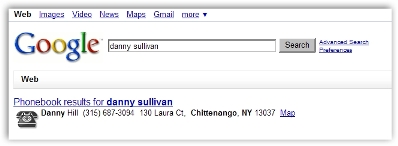
There are a couple of great articles about Google’s Universal Search at Search Engine Land - Google 2.0: Google Universal Search by Danny Sullivan, and Adapting to Google’s Universal Search by Eric Ward, both written in plain English, and offering far better explanations than I ever could.  My only comment on Universal Search is it’s still a bit buggy.

Sort of like this:

/page/26/dsgus60.jpg 

I have my fingers crossed that they have worked it out; not so much for me, I worked out years ago that I can pretty much hunt down anything on the Internet — OK, yes, sometimes it takes a few days and maybe search engine brain damage is not just hereditary, but also contagious (I think I’ve caught it) — but for everyone else out there who searches and never finds.  And to quote Walt Mossberg: “It isn’t your fault”.

Related Stories on the Internet:

Marketing Pilgrim: Google’s Search Gurus Spill Beans on Algorithm

New York Times:  Google Keeps Tweaking its Search Engine June 3, 2007

There are very few people who could have pulled off the greatest rendezvous in the history of technology, so huge hat tip to Walt Mossberg, Kara Swisher, and D: All Things Digital.

For the first time in more than 20 years, Microsoft Chairman Bill Gates, and Apple CEO Steve Jobs sat down for a public chat at D5 – the fifth session of All Things D.

The last time the two pioneers of technology were interviewed together was in 1991 by Fortune’s Brent Schlender.  The last time they appeared together on a stage was when Jobs interviewed Gates on the Macintosh Dating Game, way back in 1983.  (Included on the prologue video below.)

If you haven’t seen the footage of history’s great rendezvous, it’s time you did.  Allow about an hour 45 to watch from start to end, or read the D5 Gates and Jobs transcript.

The Prologue: Gates and Jobs at D5 7min 2sec

Bill Gates and Steve Jobs at D – Highlight Reel  8min 5sec

Gates and Jobs take questions 18min 44sec

Gates and Jobs on Their Relationship 4min 6sec

Gates and Jobs Look to the Future 10min 56sec

Gates and Jobs on Partnering 8min 16sec

Gates and Jobs on Past Mistakes 15min 10sec

Gates and Jobs Look Back to ’97 11min

Gates and Jobs on Making a Mark on History 15min 5sec

Hat tip to Matt, who points us to Full Code Press, a 24 hour contest to build a Web site for non-profits; the idea is cool in itself, yet gets way cooler when you realize the organizing committee is comprised of Australians and New Zealanders.

The event will take place in Australia on August 18, 2007; entries close June 29.  For more information visit the Web Industry Professionals Association Incorporated (Australia) or Webstock (New Zealand).

Microsoft Office 2007 introduces a whole lot of new features – revamped UI, new file formats etc.  However, one thing is missing, which is support for the Outlook protocol (outlook://).

Developers wanting to open emails from other applications could use the Outlook protocol to get Microsoft Outlook to display them.  For example, outlook:00000000AEB50BC0928BD511A2700000E8D73A91C4A56101.

This is all well for Microsoft Outlook XP and 2003 (not quite sure about 2000); however, for Microsoft Outlook 2007 Microsoft have decided to no longer support it. 

Upgrading to Outlook 2007 will remove the Outlook protocol registry details which was setup by the previous version of Outlook.

Information about this is available [buried] in http://support.microsoft.com/kb/929590, which says:

Known issues when you develop custom solutions for Office Outlook 2007

The Outlook protocol no longer works outside Outlook

The Outlook protocol (Outlook://) has been changed. This protocol will only
work when you use it in Outlook. You can use this protocol on a folder home
page, on the Web toolbar, or in the body of an Outlook item.

Now registration of the Outlook protocol is straightforward, and results in outlook.exe being invoked with the /select command line argument with the value of the Outlook protocol following.

To reactivate the Outlook protocol with Outlook 2007 installed, simple copy the following into a .REG file and double click on it from Windows Explorer.

Windows Registry Editor Version 5.00

[HKEY_CLASSES_ROOT\outlook]
“URL Protocol”=”"
@=”URL:Outlook Folders”

[HKEY_CLASSES_ROOT\outlook\DefaultIcon]
@=”C:\\Program Files\\Microsoft Office\\Office12\\OUTLOOK.EXE,-9403″

[HKEY_CLASSES_ROOT\outlook\shell]
@=”open”

[HKEY_CLASSES_ROOT\outlook\shell\open]
@=”"

[HKEY_CLASSES_ROOT\outlook\shell\open\command]
@=”\”C:\\Program Files\\Microsoft Office\\Office12\\OUTLOOK.EXE\” /select \”%1\”"

If Microsoft Outlook  2007 is not installed in default folder “C:\Program Files\Microsoft Office\Office12″ you will need to update the above accordingly.

Obviously this will only work whilst Office 2007 still supports the /select command line argument.

Also, in this day and age of automatic updates, Microsoft could, if they wished, revoke full support of the Outlook protocol at any time.

This workaround will give you some breathing space for an alternative solution to be developed.

« Previous PageNext Page »