
 Subscribe
WordPress Simple Image Link offers all users a new way for putting images in your sidebars.
Specifically designed for those with little or no HTML knowledge, WordPress Simple Image Link will save you time and effort when displaying support buttons, ads and, well, anything else which uses an image.
Once the plugin is installed, just add the “Simple Image Link” widget to any of your sidebars. Add 1, add 2, add as many as you need.
Current Version:
- Version 2.1
WordPress Compatibility:
WordPress: 2.5+
Download:
Download WordPress Simple Image Link Plugin.
NOTE:
If you were one of the three who downloaded it from our site, then please download the latest version from WordPress.org, since this will ensure you can use the automatic plugin update feature. The name of the plugin has changed from ‘Image Link’ to ‘Simple Image Link’ as there was a name conflict with the former.
History:
I wrote this plugin because it was a pain to create and update the HTML when using a text widget to display an image. Also, when there are multiple text widgets, you couldn’t remember which was which without going in and checking. Voila; WP Image Link was born.
Features/Benefits:
- Allows multiple widgets to be used within any or all of your blog sidebars.
- Widget title can be optionally displayed.
- Displays an image of any size.
- Allows the image to be scaled as an absolute pixel size or as a percentage of the original image size.
- Allows the image’s alternative text, for use by text readers, or when the image is not displayed, to be specified.
- Allows text to be displayed after the image, with an optional break between image and text.
- Allows the image to be aligned to the left or right of the sidebar, or centered within the sidebar.
- Allows a destination URL to be specified should the image be clicked on by the user.
- Allows the destination URL to be opened in the same, or a new, window.
- Allows the link for the destination URL to be created as a ‘nofollow’, ensuring Google juice does not flow to advertisers.
- Allows the image’s alternative text to be displayed as a popup on the image.
- Allows additional padding to be displayed above and below the image.
Installation:
- Upload the ‘image-link’ directory to your `/wp-content/plugins/` directory.
- Activate the plugin through the ‘Plugins’ menu in WordPress.
- Start adding “Image Link” widgets to your sidebars.
Screen shot of WordPress Simple Image Link:
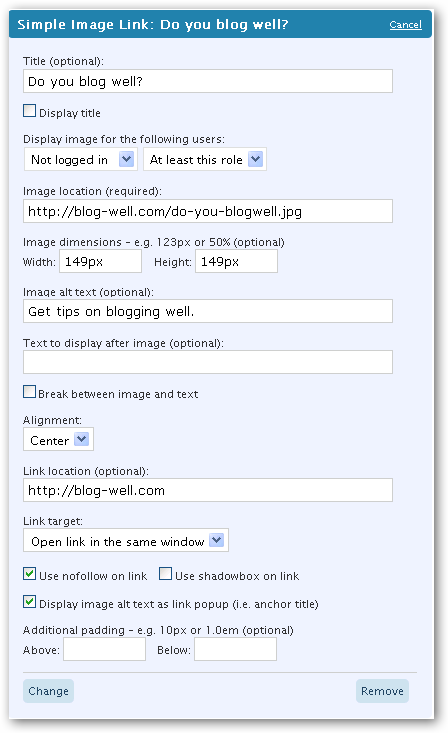
Simple Image Link Properties
Title
The title is what is displayed within the widget header when viewing your current widgets within the WordPress dashboard.

Display title
Whether the title should be displayed within the sidebar (see image below).

Display image for the following users
Allow the widget to be displayed for users with specific roles.
- Do not display - The image is not displayed to anyone
- Not logged in - Normal users who do not log in
- Subscriber - Users with the subscriber role
- Contributor - Users with the contributor role
- Author - Users with the author role
- Editor - Users with the editor role
- Administrator - Users with the administrator role
The role can be qualified by:
- At least this role - The user can be of this role or above
- Only this role - The user is only this explicit role
Image location
The location of the image to be displayed. That is, it’s URL.
Image dimensions
The width and height of the image, expressed as pixels or as a percentage of the current size.
These are optional.
If no width and height are specified, then the image will be displayed in its original size.
If the original image is larger than you require, then you can explicitly set the width and the height of the image and the browser will display the image at this size.
For example, if the original image is 300 pixels wide by 300 pixels high, and you want to display it as 150 pixels wide by 150 pixels high, then set the width and the height to ‘150px’ and ‘150px’. ‘px’ is the unit for pixels.
Alternatively, you can set the width and height both to ‘50%’, and the browser will display the image at 50% of its original width and height.
Image alt text
This is the ‘alt’ or ‘alternative text’ that is shown when images can not be displayed, or a text reader is used.
Text to display after image
Some text can be displayed after image.
Break between image and text
Whether a break is inserted between the image and text. If not selected, then a non breaking space is inserted between the image and text to ensure some visual seperation.
Alignment
Method used to align the image within the sidebar.
Available methods are:
| Left | 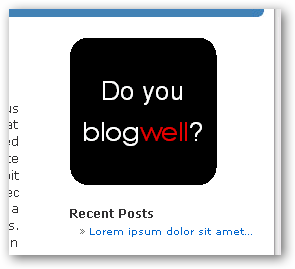 |
| Center | 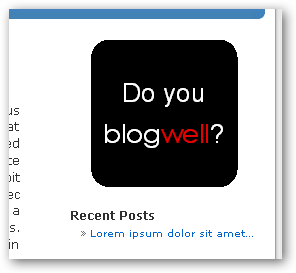 |
| Right | 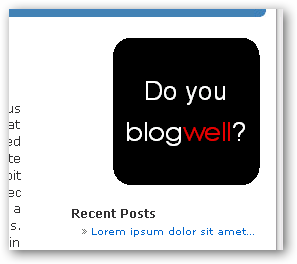 |
Link location
The destination, i.e. the URL, where the user will be taken upon clicking on the image.
Link target
This allows you to select whether to open the link in the same browser window, or a new window.
Use nofollow on link
Google recommends using ‘nofollow’ for all paid (advertising) links. Select whether you want the link to be nofollow here.
Use shadowbox on link
Add shadowbox as a rel attribute value, so that the link is opened within a Shadow Box.
NOTE: Shadow Box must be provided external to this plugin.
Display image alt text as pop up/tool tip text
Select whether you want to display the image’s alt text; i.e. the text that appears as a popup/tooltip.

Additional padding
Additional padding can be applied above and/or below the image.
Padding units should be expressed as pixels (e.g. 123px) or a multiple of the current font size (e.g. 1.5em).
The screenshot below shows how the image is displayed when applying:
- Above padding of 50px
- Below padding of 3.0em.
Special Thanks:
Kudos to the WordPress developers for providing the ‘Pattern for multi-widget’ at the bottom of wp-includes/widgets.php, without which this could not have been written.
Change Log
Version 2.1
Use correct location of plugins folder when ‘WordPress address’ and ‘Blog address’ differ within Settings.
Fixed for Robert@PNG.
Version 2.0
Allow widget to be displayed based on the user’s role - inspired by Praveen Baratam [praveen.baratam AT gmail DOT com].
Two psuedo roles are added - ‘Do not display’ replaces the “Display image” property, and ‘Not logged in’ to display image should the user not be logged in (i.e. user does not have a proper role).
Version 1.6
Correctly display <, >, &, ” and ‘ characters.
Version 1.5.1
Fixed minor spelling mistake in Portuguese translation - thanks again to Alexandre Pereira.
Version 1.5
No functional changes.
Support added for translating the text within the widget via the simple-image-link.pot file.
Translations can now be made external to the core files, allowing upgrades to not affect independent translations.
Thanks to Alexandre Pereira for providing the incentive to do this the Portuguese translations.
Version 1.4
Allows image to be hidden without having to delete the widget.
Version 1.3
Allows ’shadowbox’ to be included within the link’s rel attribute value.
NOTE: Shadow Box support must be provided external to this plugin.
Version 1.2
Added ability to specify text which appears within the sidebar.
Version 1.1
Changes to readme and screen shots.
Version 1.0
Initial version.
 Add to Delicious
 Digg This!
 Stumble This!
 Mixx This!
 Sphinn This!
41 comments:
17 trackbacks:
- WordPress Plugin: Image Link | BlogWell 14 September 2008
- WordPress Plugin Releases for 09/21 | bloground.ro - Blogging resources, WordPress themes and plugins for your development 21 September 2008
- WordPress Plugin Releases for 09/21 | Wordpress Blog NL 21 September 2008
- WordPress Plugin Releases for 09/21 | BlogBroker24-7 21 September 2008
- Последние релизы плагинов WordPress на 09/21/2008 | всё для WordPress (ВордПресс). Модули, шаблоны (скины), хаки. PHP скрипты. Движок для сайта, CMS система упра 21 September 2008
- Leonaut.com 21 September 2008
- Jezjo Blog» Blogs Wordpress Plugin » Simple Image Link by BLOGWELL 22 September 2008
- My favourite Blog Posts » Weblog Tools Collection: WordPress Plugin Releases for 09/21 | A Comprehensive Collection of Blog Posts from my favourite Blogs 24 September 2008
- Plugin Blogwell ajuda-o a adicionar imagens na sidebar | Wordpress Love - Themes, Plugins e tudo para Wordpress, em Português 27 September 2008
- Pimping Your WordPress Widget Titles | BlogWell 1 October 2008
- BlogTuga | BlogWell - PT 2 October 2008
- Плагин для WordPress | Lady Maksima 8 October 2008
- WordPess: Plugin Updates KW 42/08 | blaudenker.de 21 October 2008
- Simple Image Link Plugin Update | BlogWell 25 October 2008
- WordPress: Plugin Updates KW 43/08 | blaudenker.de 27 October 2008
- BlogWell: inserire immagini con link nella Sidebar di WordPress | rickylounge.blog 29 November 2008
- En.nicuilie.eu Blogs » Top 1000 WordPress Plugin Authors 31 December 2008







 Add to Technorati

hi. Thanks for plugin
perfect.
Regards
I would like to put a rel=”shadowbox” in the link so that when someone clicks on the image, it opens it up in the Shadowbox.
In what file do I need to add the rel= code it?
Thanks!
@James - Try version 1.3 of the plugin which allows you to do this. Please rate the plugin if you think it deserves it
Thanks, now it works great with shadowbox. But, there is an issue. If I choose to use the no follow option, the shadowbox will not function. If I disable the no follow option (box unchecked), shadowbox works.
I looked at the source and when the no follow option is used it inputs this.
rel=’nofollow shadowBox’
For the shadowbox to work, it has to be rel=”shadowbox” and not rel=’nofollow shadowBox’
Great widget! Thank you very much!
It would be even cooler if you added the image uploader and the library so that users can insert an image without copy n pasting an url. That way you could turn Wordpress into an even more awesome cms. Maybe something for version 2.0?
@James - Both nofollow and shadowbox use the rel attribute which is the reason for the conflict. When multiple entries are required, they should be space delimited, as in rel=”nofollow shadowbox”. Google and other search engines will respect this; however, it looks like your ShadowBox libraries don’t. As to whether there are any ShadowBox libraries which respect multiple values within the rel attribute I am none the wiser sorry. Maybe a request within the ShadowBox world will yield either the correct answer or a request for change.
Thanks for the plugin. Im writing a review of it to my site and will have a link back to you.
For your coding knowledge, I see that the shadowbox accepts multiple attribute by using semicolons.
For example, rel=”shadowbox;width=400;height=300″.
It’s ok, I’ll just diable the no follow option. Nothing too serious!
Oh… btw, thank you very much for a great helpful plugin. Simple and it does the job!
@James - Although I have never used ShadowBox, my understanding is that you typically use height and width parameters for content other than images - http://mjijackson.com/shadowbox/doc/usage.html.
Hopefully what is currently implemented is a good compromise - it would be nice to be all things to all men, but alas.
I am glad you found it useful.
Hey, Mad.
How would I go about putting a break between the widget title and the image? ATM, there’s no space/break between the widget title and the image.
@James - You can add space above and below the actual image by adding the following to your theme’s style sheet:
.widget_simpleimagelink img
{
padding-top: 50px;
padding-bottom: 50px;
}
You can use this technique to change any of the styles associated with the image (img tag) which occur within the Simple Image link widget, whose class is widget_simpleimagelink.
Change the 50 pixels value to one of your preference.
This approach affects all image link widgets.
If you want to effect a single image link widget, then view the page source and look for the li tag (list item) which contains the widget whose id value is simpleimagelink-N where N is a number.
For example:
<li id=”simpleimagelink-224698471″ class=”widget widget_simpleimagelink”>…</li>
You can then add style sheet entries which affect only this widget, by:
#simpleimagelink-224698471 img
{
padding-top: 50px;
padding-bottom: 50px;
}
Thank, dude! The CSS padding-top thingy works wonders!
Translated to portuguese: Download. Thanks
thanks bro,
work this plugin me and verry handy
@Alexandre - Thank you.
I have updated the widget to support people like yourself translating the strings within the plugin. Version 1.5 now contains your Portuguese translations. I have also reduced the size of the width and height text boxes allowing a translation of Width where everything remains on the same line.
Could you please test just to make sure it is working correctly?
Martyn the translation had an error, i already fix it. The new link, is this one.
@Alexandre - Thanks again. Fixed in 1.5.1.
I uploaded the simple image link plug in to my wordpress blog, but I Can’t find any place for how to manage it? I know I am slow but how do I manage those ads I want to place on my blog? What is the path so that only I can add, update, change and manage advertising on my site?
@Scott - This plugin install a simple widget which allows you to display an image within an optional link. The emphasis is on simple. If you want a more sophisticated plugin to manage ads then i would consider ones like wp125.
Just installed the widget, added our first image - and - voila! Thank you for a simple, easy aid to creating a Buddha-full blog!
Hello Mad,
Your plugin has been really useful and i am grateful you shared it with everyone.
I have extended your plugin such that the “Image Link Instance” appears only for users with particular capability/role or for all users. The Capability / Role option can be configured through widget control panel.
This modification is particularly useful for websites based on wordpress which make use of Wordpress Role/Capability based content and access management.
I have duly commented my modifications in the source code.
Hope you will integrate this feature into your plugin.
Thanks once again.
Praveen
@Praveen - You may find version 2.0 useful - inspired by your comment and initial code - Thanks
Dear Martyn,
Thanks a lot for the credit.
Actually there were many bugs in the code i sent to you last time. It was just an idea at that point of time. I fixed them. Currently i am using the modified code in my project. I need finer control over who sees what links, and i achieve that control with the help of custom capabilities, when roles alone are not sufficient.
I use your plugin to create button bars for navigation depending upon user role/capabilities. It greatly enhances Usability of a blog/portal.
So my modifications are essentially closer to what you have done with the update but with my version people can choose between Global (All / Unregistered), Role and Capability based display of the image link. Its also integrated to work with Role Manager Plugin.
All my modification are duly commented. Thank you.
Regards,
Dr. Praveen Baratam
This is a great tool!
I use it to post flyers for upcoming parties/events that I’ll be shooting in a simple, clean manner. It does exactly what I need it to. Thanks again!
I’m definitely going to use this. I’ve been trying to make a clickable widget all day. Now that this is available I can finish the job and get to bed.
Thanks for a wonderful tool.
Hi,
I have just enabled your plugin on my blog and it works great.
There is one issue that I would like your feedback on:
The plugin generates a lot of 404 errors on:
/wp-content/plugins/simple-image-link/simple-image-link.css
…and I was wandering if there is anyway of stopping these from happening.
Cheers,
R
Hi Robert,
I am glad you like our plugin.
The correct URI should be ‘blog/wp-content/plugins/simple-image-link/simple-image-link.css’.
Can you tell me the values for your WordPress and Blog addresses (URLs) within your Settings?
I do the same thing as the other plugins you have loaded, but I will test your specific setup based on your answer to the above.
Cheers
Martyn
Greeting Mad,
Thanks for getting back to me.
I have double checked the link that generates the 404 and it is definitely.
/wp-content/plugins/simple-image-link/simple-image-link.css
Here are my settings as requested:
Wordpress address (URL) is: http://www.trupela.com/blog
Blog address (URL): http://www.trupela.com
Regards,
R
Martyn,
I am forcing a 301 redirect from: /wp-content/plugins/simple-image-link/simple-image-link.css
to:
/blog/wp-content/plugins/simple-image-link/simple-image-link.css
and all seems OK from a 404 perspective (nil 404’s).
Interestingly I am not seeing any difference with the image displayed via the widget - Are we meant to see a difference? And if it made no difference to the image itself with or with or without simple-image-link.css - then what exactly is the purpose of simple-image-link.css?
Hope my question is clear.
R
NB: Thanks for your support and willingness to assist with the issue at hand
@Robert - I was incorrectly using the ‘Blog address’ rather than the ‘WordPress address’ when determining the location of the plugins folder. Please update to version 2.1 of the plugin and all should be resolved.
Cheers
Hi Martyn,
Thanks!
Have updated plugin, removed redirect and appears to working well - ie no 404 errors.
I remain curious whether I can make changes to: simple-image-link.css to customise the displayed image even further. Eg: if I wanted to display a border around the image.
Regards,
R
Robert - I would not recommend changing the plugin’s style sheet, since it will be overwritten on the next update. I would instead use your current theme’s style sheet to apply the required changes. See my comment dated September 25 above.
Cheers
Hi, I thought I’d take a chance and try to install it on my blog (I’m using WP 2.7 and I couldn’t find any info saying it was okay for this new version). After I installed it, I couldn’t see it on my list of plugins. I activated it just in case and still can’t see it on my plug ins - I’m going to go up to my server and manually remove it from my plugins folder. Does anyone else out there have any info about 2.7 and this plugin? I’d really like to use it…
Hi Tanya,
The plugin has been working fine on my 2.7 blog for some time. I run the K2 theme - latest build (743) with about a squillion other plugins and have not found any issues related to this plugin specifically.
Regards,
R
Thanks Robert, I’ll look at the plugin again before I give up on it now that you’ve given me hope -
hi Mad,
is there a way to call this plugin direct, for a non widget ready blog and which syntax can be used then - ?! thanks for help and answer.
@Tanya - We are running 2.7 for Blog-Well and the images you see are all done using the plugin.
@nilson - Unfortunately there is no lower level interface which could be called. All entry points into the plugin’s code are all done through the multi-instance plugin interface used by WorPress. The plugin just provides an easy way to create an image element within a link element, without having to correctly encode it within WordPress’ standard text control.
Hello
I have tried to upload the image to my sidebar and there is an error, instead of the image is a small red cross?Any ideas?
@Adam - Enter the URL of the image within the browser address bar to confirm that the image exists. It is best to work with fully qualified resources, such as “http://example.com/images/foo.png”, or “/images/foo.png”.
Every time I want to open plugin menu to activate the plugin I always get 404 error. Before that I have copied the plugin to plugins direktory. What’s wrong with my blog?
Regards
Thanks a lot for the great plugin/widget. Good job.
I am using it to make links to my other social media sites and I was wondering if it would be possible somehow have the image links in a row next to each other? Kind of like having two or more of image links within the same sidebar widget? Now I have used two of them on top of each other, and that takes more space. Maybe a future feature?
Thanks a lot! Yellow regards.